🛣️ Cilium Gateway API
Cilium Gateway API는 두 가지 모드를 지원한다:
- Standalone DaemonSet mode: 각 노드마다 별도의 Envoy를 실행
- Embedded mode: Cilium Agent에 Envoy를 내장
기본적으로 신규 설치에서는 Standalone DaemonSet mode를 사용한다.
helm values에서 envoy.enabled를 false로 설정하면 Embedded mode로 변경할 수 있다.
1
2
3
4
5
6
7
8
|
envoy:
  # @schema
  # type: [null, boolean]
  # @schema
  # -- Enable Envoy Proxy in standalone DaemonSet.
  # This field is enabled by default for new installation.
  # @default -- `true` for new installation
  enabled: ~
|
다른 Controller들과의 차이점
구현이 CNI와 결합이 얼마나 되었는가의 차이가 가장 크다.
Cilium에게는 Ingress와 Gateway API는 네트워킹 스택의 일부이고, 다른 컨트롤러들과는 다르게 동작한다.
다른 Ingress 또는 Gateway API 컨트롤러는 Deployment 또는 Daemonset으로 설치되어서 LoadBalancer 등으로 노출된다(Cilium도 가능하다)
Cilium의 Ingress와 Gateway API의 설정은 Loadbalancer 또는 NodePort로 노출되어 있거나, Host network로 노출될 수 있다.
트래픽이 도착하면, eBPF 코드는 트래픽을 가로채서 투명하게 Envoy로 전달한다.
CiliumNetworkPolicy와의 연동도 가능하다.
Cilium의 Ingress Config와 CiliumNetworkPolicy
Ingress와 Gateway API의 트래픽은 노드마다 있는 Envoy 프록시를 통해서 벡엔드 서비스에 도달한다.
노드의 Envoy 프록시는 eBPF 정책 엔진과 상호작용하는 특수 코드가 있어서, 정책을 조회할 수 있다.
수평 트래픽의 네트워크 정책을 조정할 수 있다.
그러나, ingress 설정에서는 추가 과정이 필요하다.
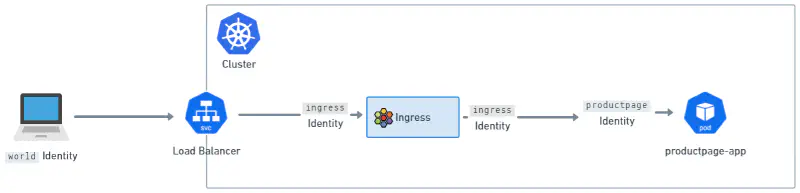
Envoy에 도착한 트래픽은 Cilium Policy Engine에서 특별한 ingress 신원을 가진다.
외부에서 오는 트래픽은 world라는 신원을 가진다.
네트워크 정책을 클러스터에 적용할 때, world → ingress → 목적지 pod의 신원 설정이 중요하다.

NOTE
Cilium을 통해 클러스터 내부에서 ingress controller를 사용하던, gateway api controller를 사용하던, envoy의 신원은 ingress이다.
Source IP 가시성
벡엔드가 어느 IP에서 요청왔는지 이해하는 것에 대해서는 대부분의 애플리케이션에서 중요한 일이다.
기본적으로, Cilium의 Envoy 인스턴스는 X-Forwarded-For 헤더를 붙여서 서버에 전달한다.
그리고, 신뢰할 수 있는 hop 수를 조정해서, 어떤 IP를 실제 클라이언트로 볼지 결정한다.
X-Forwarded-For에는 값이 여러 개 추가될 수가 있다.
1
2
|
# 순서대로 2, 1, 0번
X-Forwarded-For: 203.0.113.42, 10.0.0.5, 10.0.0.10
|
이 중에서 n번째 홉을 고르도록 해서, 맨 오른쪽 부터 0번이다.
기본 값은 0으로, Envoy의 바로 앞단의 IP를 본다는 뜻이다.
X-Envoy-External-Address에 실제 클라이언트 주소만 따로 떼어서 준다.
예를 들면, 앞단에 클라우드 로드 밸런서가 붙어있다면, trusted hops=1이어야 한다.
이외 네트워크 구성에 따라 신뢰할 수 있는 앞단의 홉 수를 조정할 수 있다. \
홉의 수는 helm values에서 gatewayAPI.xffNumTrustedHops로 설정할 수 있다.
externalTrafficPolicy
Cilium의 Ingress(Ingress, Gateway API 모두)는 LoadBalancer 또는 NodePort서비스를 사용한다.
Service 오브젝트는 Client IP를 가시성에 관련된 필드가 하나 있다: externalTrafficPolicy이다.
기존의 Kubernetes에서의 externalTrafficPolicy는 다음과 같다:
Local: 로컬 노드의 Pod들에만 트래픽을 라우트한다.
- 이 때문에,
kube-proxy를 쓰는 기존 다른 CNI의 클러스터는 source IP 가시성을 보장하는 유일한 방법이다.
- 이 경우, 노드들이 healthCheckNodePort를 열고,
http://<nodeIP>:<healthCheckNodePort>/healthz로 요청을 보내면 로컬 Pod가 200을 응답할 것이고, 없으면 200이 아닌 응답을 보낼 것이다.
- 때문에 실제 Pod로 라우트가능한 노드만 로드밸런서가 보낼 수 있다.
Cluster: 노드는 클러스터 전역의 어디에도 트래픽을 보낼 수 있다.
- 업스트림 로드밸런서들은 트래픽을 아무 노드에나 보낼 수 있다는 것을 알고, source IP를 변환할지도 모른다.
- 즉, 대부분의 상황에서는
externalTrafficPolicy: Cluster는 벡엔드 Pod가 소스 IP를 안봐도 된다는 이야기이도 하다.
그러나, Cilium Ingress에서는 트래픽이 어느 노드로 와도 그 노드의 로컬 Envoy가 TPROXY로 원본 source IP를 유지한 채 받기 때문에, Cluster여도 client IP visibility를 확보할 수 있다.
또한 Envoy를 노출하는 Cilium Service에서는 Local이어도 모든 노드가 health check를 통과하도록 처리한다.
즉, 아래와 같다:
- 로컬 노드에 애플리케이션 backend Pod가 없어도
- 로컬 Envoy는 존재하고 health check도 통과
- 요청은 일단 그 로컬 Envoy가 받고
- 이후 클러스터의 다른 노드에 있는 backend endpoint로 전달 가능
TLS Passthrough 및 Source IP 가시성
Ingress와 Gateway API는 TLS Passthrough를 지원한다.
TLS Passthrough에서는 Envoy가 TLS를 종료하지 않고 TCP 프록시로 동작하므로, HTTP 헤더인 X-Forwarded-For를 추가할 수 없다. \
Envoy는 TLS handshake의 ClientHello에 포함된 SNI(Server Name Indication) 를 보고 어떤 backend로 보낼지 결정한다.
이후 backend와 새로운 TCP 연결을 만들어 TLS 스트림을 그대로 전달하기 때문에, backend 입장에서는 source IP가 원래 클라이언트가 아니라 Envoy IP로 보이게 된다.
Host 네트워크 모드
Host 네트워크에 직접 연결하도록 노출할 수 있다.
LoadBalancer가 불가능한 상황에서 외부에 노출할 때 유용하다.
helm values에 아래와오 같이 설정하면 된다:
1
2
3
4
|
gatewayAPI:
	enabled: true
	hostNetwork:
		enabled: true
|
한번 활성화되면, Gateway를 위한 호스트 네트워크 포트가 spec.listeners.port에 명시될 수 있다.
포트는 1023 이상이어야 한다.
Privileged Port로의 바인딩
기본적으로 Cilium L7 Envoy는 well-known포트를 쓸 권한이 없다.
만약 1023이하의 포트를 고르려면, Helm 값에서 envoy.securityContext.capabilities.keepCapNetBindService=true가 설정되었고, NET_BIND_SERVICE를 설정해야 한다.
Standalone DaemonSet mode 예시:
 1
 2
 3
 4
 5
 6
 7
 8
 9
10
11
12
|
gatewayAPI:
  enabled: true
  hostNetwork:
    enabled: true
envoy:
  enabled: true
  securityContext:
    capabilities:
      keepCapNetBindService: true
      envoy:
      # Add NET_BIND_SERVICE to the list (keep the others!)
      - NET_BIND_SERVICE
|
Embedded mode 예시:
 1
 2
 3
 4
 5
 6
 7
 8
 9
10
11
12
13
|
gatewayAPI:
  enabled: true
  hostNetwork:
    enabled: true
envoy:
  securityContext:
    capabilities:
      keepCapNetBindService: true
securityContext:
  capabilities:
    ciliumAgent:
    # Add NET_BIND_SERVICE to the list (keep the others!)
    - NET_BIND_SERVICE
|
Gatewat API리스너를 노드의 서브셋으로 배포
Cilium Gateway API Envoy 리스터는 노드의 부분집합으로 노출될 수 있다.
host 네트워크 모드에서만 가능하고, node labelselector가 동작한다.
예시 values:
1
2
3
4
5
6
7
8
|
gatewayAPI:
  enabled: true
  hostNetwork:
    enabled: true
    nodes:
      matchLabels:
        role: infra
        component: gateway-api
|
Gateway API 주소 지원
Cilium Gateway는 Gateway API 스텍에 제공된 주소가 있다.
spec.addresses는 Gateway의 IP주소로 쓰인다.
 1
 2
 3
 4
 5
 6
 7
 8
 9
10
11
12
13
14
15
16
|
apiVersion: gateway.networking.k8s.io/v1
kind: Gateway
metadata:
  name: my-gateway
spec:
  addresses:
  - type: IPAddress
    value: 172.18.0.140
  gatewayClassName: cilium
  listeners:
  - allowedRoutes:
      namespaces:
        from: Same
    name: web-gw
    port: 80
    protocol: HTTP
|
출력은 다음과 같이 예상된다:
1
2
3
|
$ kubectl get gateway my-gateway
NAME         CLASS    ADDRESS        PROGRAMMED   AGE
my-gateway   cilium   172.18.0.140   True         2d7h
|
io.cilium/lb-ipam-ips를 spec.infrastructure.annotations를 IP설정에 썼다면, spec.addresses는 무시 될 것이다.
 1
 2
 3
 4
 5
 6
 7
 8
 9
10
11
12
13
14
15
16
17
18
19
|
apiVersion: gateway.networking.k8s.io/v1
kind: Gateway
metadata:
  name: my-gateway
spec:
  infrastructure:
    annotations:
      io.cilium/lb-ipam-ips: "172.18.0.141"
  addresses: # This will be ignored
  - type: IPAddress
    value: 172.18.0.140
  gatewayClassName: cilium
  listeners:
  - allowedRoutes:
      namespaces:
        from: Same
    name: web-gw
    port: 80
    protocol: HTTP
|
출력은 다음과 같다:
1
2
3
|
$ kubectl get gateway my-gateway
NAME         CLASS    ADDRESS        PROGRAMMED   AGE
my-gateway   cilium   172.18.0.141   True         2d7h
|
🏃 Hands-On
CRD설치 및 helm values 설정
Gateway API CRD를 설치해야 한다.
1
2
3
4
5
|
kubectl apply -f https://raw.githubusercontent.com/kubernetes-sigs/gateway-api/v1.4.1/config/crd/standard/gateway.networking.k8s.io_gatewayclasses.yaml
kubectl apply -f https://raw.githubusercontent.com/kubernetes-sigs/gateway-api/v1.4.1/config/crd/standard/gateway.networking.k8s.io_gateways.yaml
kubectl apply -f https://raw.githubusercontent.com/kubernetes-sigs/gateway-api/v1.4.1/config/crd/standard/gateway.networking.k8s.io_httproutes.yaml
kubectl apply -f https://raw.githubusercontent.com/kubernetes-sigs/gateway-api/v1.4.1/config/crd/standard/gateway.networking.k8s.io_referencegrants.yaml
kubectl apply -f https://raw.githubusercontent.com/kubernetes-sigs/gateway-api/v1.4.1/config/crd/standard/gateway.networking.k8s.io_grpcroutes.yaml
|
TLSRoute(experimental)도 설치하고 싶다면, 아래와 같이 설치한다.
1
|
kubectl apply -f https://raw.githubusercontent.com/kubernetes-sigs/gateway-api/v1.4.1/config/crd/experimental/gateway.networking.k8s.io_tlsroutes.yaml
|
gateway API가 활성화되어야 한다.
1
2
|
gatewayAPI:
  enabled: true # ingress.enabled = false로 되어야 한다.
|
데모 애플리케이션 생성
1
2
3
4
5
6
7
8
|
git clone https://github.com/fudoge/cilium-playground.git
cd cilium-playground

# gRPC 애플리케이션
kubectl apply -f grpc/grpc-app

# HTTP 애플리케이션
kubectl apply -f http/http-app
|
GatewayClass 생성
helm values에서 gatewayAPI.gatewayClass.create: auto로 설정하면 GatewayClass가 자동으로 생성된다. \
또는, 아래처럼 직접 만들 수있다.
 1
 2
 3
 4
 5
 6
 7
 8
 9
10
11
12
13
14
15
16
17
18
19
20
21
22
|
apiVersion: gateway.networking.k8s.io/v1
kind: GatewayClass
metadata:
  name: example-gateway-class
spec:
  controllerName: io.cilium/gateway-controller # Cilium gateway의 controller name임
  description: The default Cilium GatewayClass
  parametersRef:
    group: cilium.io
    kind: CiliumGatewayClassConfig
    name: example-gateway-config
    namespace: default
---
apiVersion: cilium.io/v2alpha1
kind: CiliumGatewayClassConfig
metadata:
  name: example-gateway-config
  namespace: default
spec:
  service:
    type: LoadBalancer
---
|
NOTE
로드밸런서 또는 외부 노출은 L2 announcement또는 BGP Peering으로 광고하거나, 다른 방법이 없다면 NodePort를 사용해야 한다.
Gateway 생성
 1
 2
 3
 4
 5
 6
 7
 8
 9
10
11
12
13
14
15
16
17
18
19
20
21
|
apiVersion: gateway.networking.k8s.io/v1
kind: Gateway
metadata:
  name: example-gateway
spec:
  gatewayClassName: example-gateway-class
  listeners:
    - protocol: HTTP
      port: 8080
      name: web-gw
      # 같은 네임스페이스의 route만 허용. 만약 다른 namespace의 route를 허용하고 싶다면 `All`로 설정한다.
      # 또는 matchLabels등을 사용할 수 있다.
      allowedRoutes:
        namespaces:
          from: Same
    - protocol: HTTP
      port: 50051
      name: grpc-gw
      allowedRoutes:
        namespaces:
          from: Same
|
grpc-gw도 HTTP 프로토콜임을 볼 수 있는데, gRPC도 http에서 동작하기 떄문이다.
Route 생성
HTTPRoute
 1
 2
 3
 4
 5
 6
 7
 8
 9
10
11
12
13
14
15
16
17
18
19
|
apiVersion: gateway.networking.k8s.io/v1
kind: HTTPRoute
metadata:
  name: http-test-app
spec:
  parentRefs:
  - name: example-gateway
    namespace: default
    sectionName: http-gw # listener의 name과 일치해야 한다.
  hostnames:
    - http-test.mynetwork.local
  rules:
  - matches:
    - path:
        type: PathPrefix
        value: /
    backendRefs:
    - name: http-test
      port: 8080
|
GRPCRoute
 1
 2
 3
 4
 5
 6
 7
 8
 9
10
11
12
13
14
15
16
17
18
19
|
apiVersion: gateway.networking.k8s.io/v1
kind: GRPCRoute
metadata:
  name: grpc-test-app
spec:
  parentRefs:
    - name: example-gateway
      namespace: default
      sectionName: grpc-gw
  hostnames:
    - grpc-test.mynetwork.local
  rules:
    - matches:
        - method:
            service: test.v1.TestService
            method: Ping
      backendRefs:
        - name: grpc-test
          port: 50051
|
service와 method의 매칭은 아래 protobuf를 보면 이해 될 것이다.
서비스명은 패키지 포함 풀 네임이어야 하며, 메서드 이름도 정확히 맞춰야 한다.
 1
 2
 3
 4
 5
 6
 7
 8
 9
10
11
12
13
14
15
16
17
18
19
|
# proto/test/v1/test.proto
syntax = "proto3";

package test.v1;

option go_package = "test/v1;testv1";

service TestService {
  rpc Ping(PingRequest) returns (PingResponse);
}

message PingRequest {
  string message = 1;
}

message PingResponse {
  string message = 1;
  int64 server_time_ms = 2;
}
|
조회 및 요청 테스트
우선, service를 조회해보자.
1
2
3
4
5
6
|
$ kubectl get svc
NAME                             TYPE           CLUSTER-IP      EXTERNAL-IP   PORT(S)                          AGE
cilium-gateway-example-gateway   LoadBalancer   10.101.100.12   172.20.0.2    8080:31832/TCP,50051:31376/TCP   5m27s
grpc-test                        ClusterIP      10.105.48.100   <none>        50051/TCP                        27m
http-test                        ClusterIP      10.96.66.40     <none>        8080/TCP                         5d12h
kubernetes                       ClusterIP      10.96.0.1       <none>        443/TCP                          17d
|

나는 /etc/hosts에서 EXTERNAL-IP를 추가해줬다.
1
2
|
# /etc/hosts
172.20.0.2 http-test.mynetwork.local grpc-test.mynetwork.local
|
이제, 요청을 보내보자.
1
2
3
4
5
6
7
8
9
|
# HTTP 요청
$ curl http-test.mynetwork.local:8080
hello from http server
method=GET path=/ time=2026-03-18T03:38:35Z

# gRPC 요청
# 데모 gRPC 서버에 대한 Client App: https://github.com/fudoge/cilium-playground/blob/main/grpc/grpc-app/cmd/client/main.go
$ go run main.go -addr grpc-test.mynetwork.local:50051
2026/03/18 12:38:33 response message="hello" server_time_ms=1773805113280
|

📚 Reference