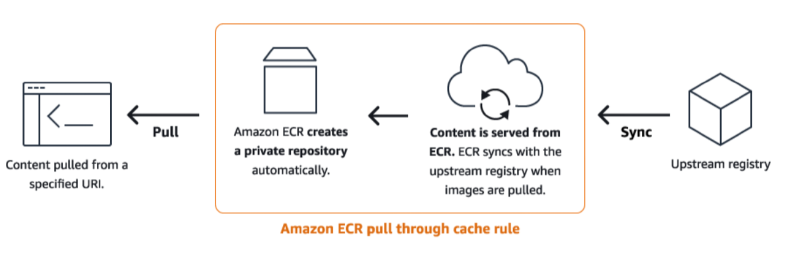
캡스톤디자인 프로젝트를 하는데, 예산 문제로 EKS 클러스터를 매일 올리고 내려야 하는 상황에 도달했다.
EKS의 Control Plane 비용만 해도, 서울 리전 기준 $0.10 / hr이기 때문이다.
그래서 작업할 때에만 클러스터를 올리고, 내려야 하며, NAT Gateway도 야간에는 내리는 방식의 운영을 하려고 한다.
RDS는 suspend를, elasticache는 서버리스를 쓸 것 같다.
그러나, 한 가지 함정이 있었다.
매일 새로운 클러스터가 똑같은 이미지들을 풀링하는 것이다.
각종 운영도구들 말이다.
Cilium, GitOps, Observability 등의 동일한 컨테이너 이미지들을 매일 받아야 한다.
Docker Hub, Quay, ghcr.io, k8s.io, Public ECR 등, 여러 이미지들을 Pull 해와야 하는데, 이들을 모두 NAT Gateway를 통해서 노드가 받아온다.
즉, NAT Gateway에서 추가 트래픽 비용이 발생한다.
이를 방지하기 위해, ECR에 캐시 레지스트리르 만들고, VPC Endpoint로 비용을 줄여보고자 한다.
📏 ECR Pull Through Cache Rule
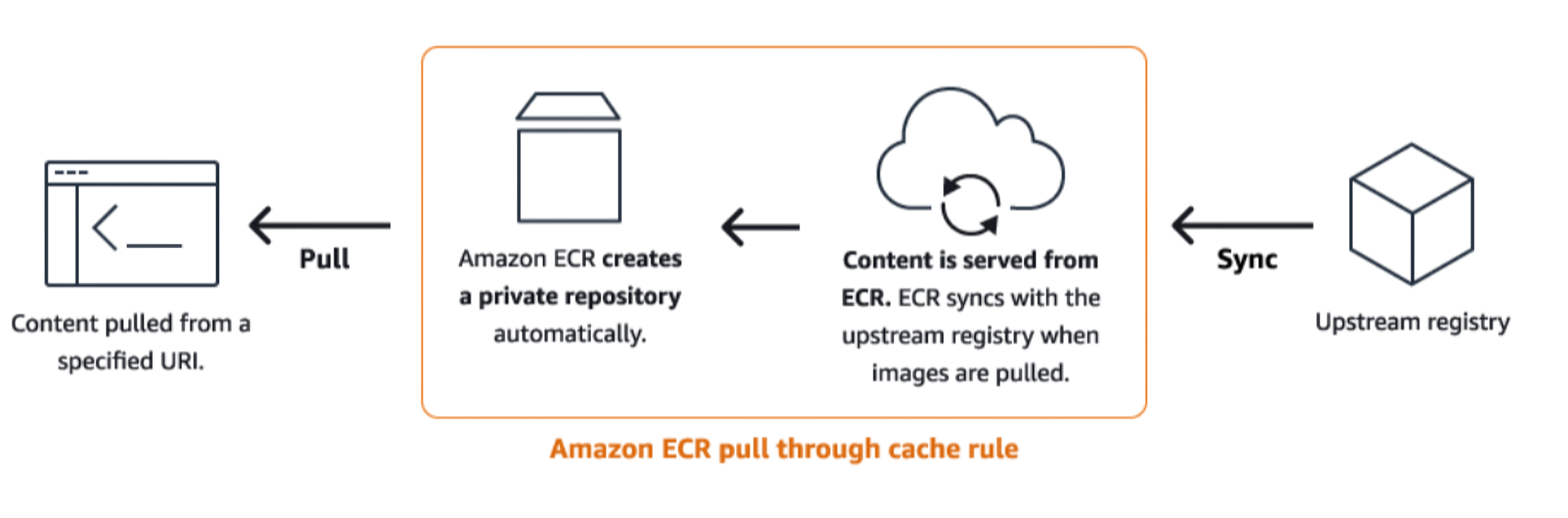
Pull Through Cache Rule은 직접 레지스트리를 만들지 않는다.
이후, 첫 pull 요청이 오면, 이용하는 인스턴스(EC2, ECS, EKS 등)는 실제 Private Registry를 만들고, 원본 이미지를 받아오도록 요청한다.
이후 다른 이미지들도 그렇게 누적되면서, 그 Private Registry에 다른 캐시들도 쌓인다.
룰 사용을 위해 필요한 것들
AWS ECR은 업스트림으로부터 컨테이너의 캐시 레지스트리를 만드는 것을 지원한다.
해당 레지스트리를 이용하는 주체(ECS, EKS 등)는 다음의 권한을 가져야 있는 것이 좋다:
ecr:BatchImportUpstreamImage: 외부 이미지를 받고 프라이빗 레지스트리에 저장시키는 것을 요청ecr:CreateRepository: 프라이빗 레지스트리를 만들기 위한 권한, 레지스트리 자체가 없는 경우 필요
또한, ECR로부터 이미지를 받기 위해서는 다음의 권한도 가져야 한다:
 1
 2
 3
 4
 5
 6
 7
 8
 9
10
11
12
13
14
15
|
{
  "Version":"2012-10-17",
  "Statement": [
    {
      "Effect": "Allow",
      "Action": [
        "ecr:BatchCheckLayerAvailability",
        "ecr:BatchGetImage",
        "ecr:GetDownloadUrlForLayer",
        "ecr:GetAuthorizationToken"
      ],
      "Resource": "*"
    }
  ]
}
|
Pull Through Cache Rule을 만드는 주체는 ecr:CreatePullThroughCacheRule이 있어야 한다. \
업스트림 레지스트리에서 자격 증명을 요구한다면, secrets manager를 이용해서 값을 넣어야 한다. \
- Secret의 이름은
ecr-pullthroughcache/로 시작해야 한다.
- 해당 시크릿과 Pull Through Cache Rule의 리전이 일치해야 한다.
업스트림 레지스트리
업스트림 레지스트리들은 다음과 같다:
public.ecr.aws: ECR Public{registryId}.dkr.ecr.{region}.amazonaws.com: ECR Privateregistry.k8s.io: Kubernetesquay.io: Quaycgr.dev: ChainGuardghcr.io: GitHub Container Registry{custom}.azurecr.io: Azure Container Registryregistry.gitlab.com: GitLab Container Registry
Repository Prefix
Pull Through Cache 레포지토리는 캐시 저장소 경로와 upstream 저장소 경로 사이의 prefix 변환 규칙을 설정할 수 있다. \
- ECR repository prefix: ECR 측에서 사용자가 pull 할 때 보는 캐시 레지스트리의 prefix이다.
- Upstream repository prefix: 원본 upstream registry측의 저장소 이름 prefix이다.
ROOT라는 특별한 키워드가 있는데, 이는 별도 prefix가 없음을 말한다.
예시로, 다음의 변환들을 볼 수 있다:
| Cache(ECR repository) namespace |
Upstream namespace |
Mapping |
| ecr-public |
ROOT(default) |
ecr-public/my-app/image1 -> ecr-public/my-app/image1 |
| ROOT |
ROOT |
my-app/image1 -> my-app/image1 |
| team-a |
team-a |
ecr-public/my-app/image1 -> ecr-public/my-app/image2 |
| my-app |
upstream-app |
my-app/image1 -> upstream-app/image1 |
NOTE
Prefix의 끝에는 자동으로 /가 적용된다.
즉, ecr-public이라고 적으면, ECR은 ecr-public/이라고 인식한다.
🍱 ECR Repository Creation Template
ECR Repository Creation Template은 최초 푸시 시 생성, Pull through Cache, 복제 등의 작업에서 여러 구성 설정을 적용시키기 위한 미리 정의해두는 탬플릿이다.
Prefix로 매칭된다.
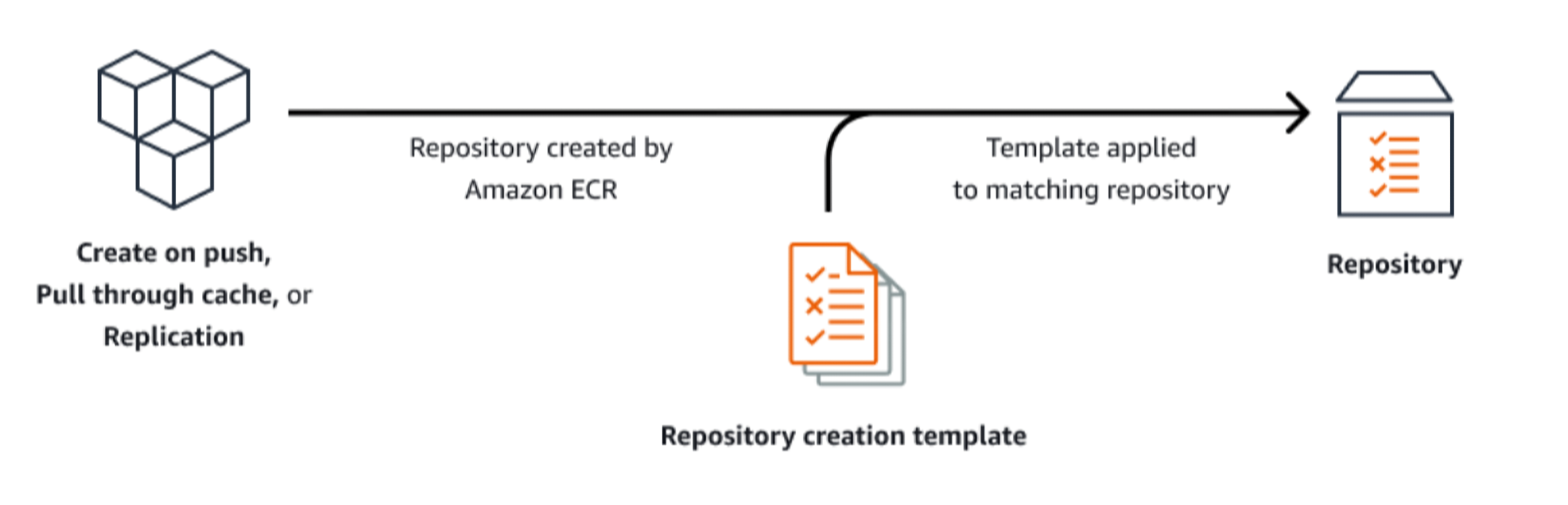
이미지 태그의 mutable설정, 암호화 설정, 레포지토리 정책, 태그, lifecycle policy, IAM Role할당 등을 할 수 있다.
⏳ Lifecycle Policy
Amazon ECR에서는 컨테이너 이미지의 생명 주기 관리를 하여 비용 절감이 가능하다.
lifecycle policy가 레포지토리에 적용되면,
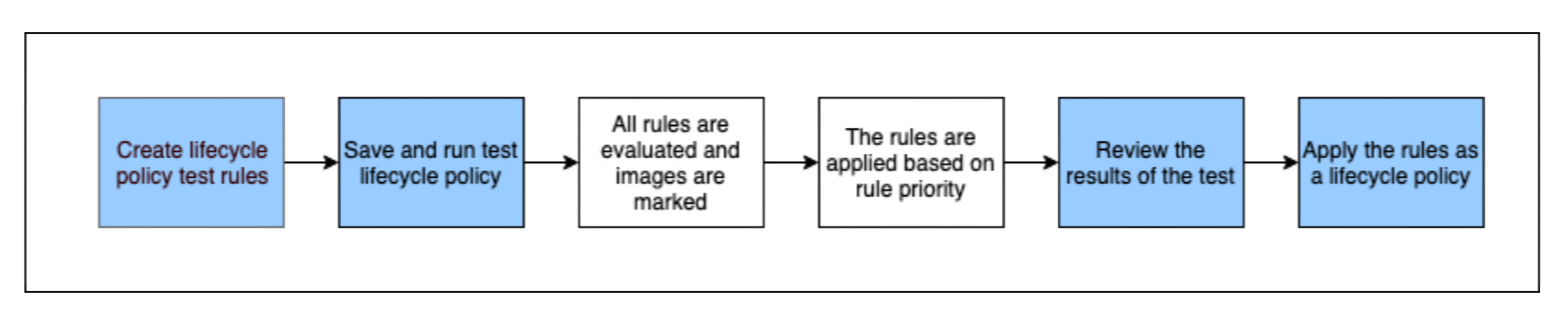
- 사용자가 lifecycle policy 규칙을 생성
- rule을 저장하고 미리 preview로 확인한다.
- 확인 후 policy를 적용한다.
- 적용 후에는 조건을 만족한 이미지가 24시간 이내에 처리된다.
Rule들은 priority가 있으며, 낮은 순서가 우선순위이다.
그러나, ECR의 evaluator는 모든 이미지들에 모든 규칙들을 적용하여 검사하고, 이후 우선순위에 따라 적용한다. \
생명주기는 이미지를 제거하는 방법만 있지 않고, 다른 방법도 존재한다.
expire: 완전히 삭제archive: 보관 상태로 전환
Rule은 json으로 작성되며, 아래의 포맷을 가진다:
 1
 2
 3
 4
 5
 6
 7
 8
 9
10
11
12
13
14
15
16
17
18
19
20
21
|
{
  "rules": [
    {
      "rulePriority": integer,
      "description": "string",
      "selection": {
        "tagStatus": "tagged"|"untagged"|"any",
        "tagPatternList": list<string>,
        "tagPrefixList": list<string>,
        "storageClass": "standard"|"archive",
        "countType": "imageCountMoreThan"|"sinceImagePushed"|"sinceImagePulled"|"sinceImageTransitioned",
        "countUnit": "string",
        "countNumber": integer
      },
      "action": {
        "type": "expire"|"transition",
        "targetStorageClass": "archive"
      }
    }
  ]
}
|
여러 예제들은 여기]에서 확인가능하다.
여러 주의할 점들이 있다:
tagPatternList와 tagPrefixList는 같이 사용할 수 없다tagPatternList와 tagPrefixList의 값들은 AND조건으로 맞아야 한다.
예를 들어, tagPrefixList = ["prod", "stable"]이면, 해당 이미지는 prod로 시작하는 태그와 stable로 시작하는 태그 모두 있어야 한다.untagged 이미지들에 대한 정책은 하나의 storageClass만을 선택해야 한다.- 시간 기준은 항상 최신 이미지들이 남는다
✨ VPC Endpoint
기본적으로 필요한 VPC Endpoint들
VPC Endpoint로 ECR에 비용 효율적으로 컨테이너를 받아올 수 있다.
com.amazonaws.{region}.ecr.dkr: Docker client 명령(pull, push)등에 대한 API를 위해 사용com.amazonaws.{region}.ecr.api: ECR API에 대해 연결(DescribeImages나 CreateRepository와 같은 API)
이 두 가지 Endpoint들에 대해서, Private DNS Name 옵션을 켜줘야 한다.
또한, Endpoint의 ENI들에 적용할 보안그룹에서는 Ingress로 tcp 443, 즉 https를 허용해야 한다.
그러나, 이들만으로는 부족한데, ECR은 Amazon S3에 이미지 레이어들을 저장하기에, S3 gateway endpoint까지 필요하다.
엔드포인트명은 com.amazonaws.{region}.s3이다.
EKS에서 필요한 VPC Endpoint들
이외에도, EKS를 사용한다면, 아래 표에서 더 많은 VPC Endpoint들을 고려해볼 수 있다:
| Service |
Endpoint |
| Amazon EC2 |
com.amazonaws.{region}.ec2 |
| Amazon ECR |
com.amazonaws.{region}.ecr.api, com.amazonaws.{region}.ecr.dkr, com.amazonaws.{region}.s3 |
| Amazon ALB |
com.amazonaws.{region}.elasticloadbalancing |
| (Optional) AWS X-ray |
com.amazonaws.{region}.xray |
| (Optional) AWS SSM |
com.amazonaws.{region}.ssm |
| Amazon CloudWatch Logs |
com.amazonaws.{region}.logs |
| Amazon STS(Security Token Service) |
com.amazonaws.{region}.sts |
| Amazon EKS Auth(required when using Pod Identity associations) |
com.amazonaws.{region}.eks-auth |
| Amazon EKS |
com.amazonaws.{region}.eks |
Pull Through Cache 생성
  1
  2
  3
  4
  5
  6
  7
  8
  9
 10
 11
 12
 13
 14
 15
 16
 17
 18
 19
 20
 21
 22
 23
 24
 25
 26
 27
 28
 29
 30
 31
 32
 33
 34
 35
 36
 37
 38
 39
 40
 41
 42
 43
 44
 45
 46
 47
 48
 49
 50
 51
 52
 53
 54
 55
 56
 57
 58
 59
 60
 61
 62
 63
 64
 65
 66
 67
 68
 69
 70
 71
 72
 73
 74
 75
 76
 77
 78
 79
 80
 81
 82
 83
 84
 85
 86
 87
 88
 89
 90
 91
 92
 93
 94
 95
 96
 97
 98
 99
100
101
102
103
104
105
106
107
108
109
110
111
112
113
114
115
116
117
118
119
120
121
122
123
124
125
126
127
128
|
locals {
  # 자격증명들
  cache_creds = {
    docker-hub = {
      username    = var.dockerhub_username
      accessToken = var.dockerhub_access_token
    }
    ghcr = {
      username    = var.ghcr_username
      accessToken = var.ghcr_access_token
    }
  }

  # Pull through cache rule들 정보를 map형태로
  pull_through_cache_rules = {
    k8s = {
      upstream_registry_url = "registry.k8s.io"
      needs_auth            = false
    }
    ecr-public = {
      upstream_registry_url = "public.ecr.aws"
      needs_auth            = false
    }
    quay = {
      upstream_registry_url = "quay.io"
      needs_auth            = false
    }
    ghcr = {
      upstream_registry_url = "ghcr.io"
      needs_auth            = true
    }
    docker-hub = {
      upstream_registry_url = "registry-1.docker.io"
      needs_auth            = true
    }
  }
}

## ECR Caches for external registries

# 시크릿
# 기본 KMS(AWS Managed Key) 사용중
# 필요시 CMK(Customer Managed Key) 사용가능
resource "aws_secretsmanager_secret" "cache_cred" {
  for_each    = local.cache_creds
  name        = "ecr-pullthroughcache/${each.key}"
  description = "Credentials for ECP pull through cache: ${each.key}"
}

# 시크릿 정보 저장
# 주의: secret_version을 이용한 이러한 방법은 tfstate에 시크릿 정보가 저장될 수 있음
# 그래서 시크릿 데이터 자체는 IaC를 이용하지 않는 경우도 있음
resource "aws_secretsmanager_secret_version" "cache_cred" {
  for_each  = local.cache_creds
  secret_id = aws_secretsmanager_secret.cache_cred[each.key].id
  secret_string = jsonencode({
    username    = each.value.username
    accessToken = each.value.accessToken
  })
}

# Pull through cache rule
# locals에있는 레지스트리정보들마다 생성
# Template의 prefix와 맞춤
resource "aws_ecr_pull_through_cache_rule" "cache" {
  for_each = local.pull_through_cache_rules

  ecr_repository_prefix = each.key
  upstream_registry_url = each.value.upstream_registry_url

  credential_arn = each.value.needs_auth ? aws_secretsmanager_secret.cache_cred[each.key].arn : null
}

# Template
# Pull through cache에서 생성됨
# 태그는 IMMUTABLE
# prefix는 pull_through_cache_rule의 prefix와 맞춤
resource "aws_ecr_repository_creation_template" "cache_template" {
  for_each = local.pull_through_cache_rules

  prefix = each.key

  description          = "Template for cache registries"
  image_tag_mutability = "IMMUTABLE"

  applied_for = [
    "PULL_THROUGH_CACHE",
  ]

  # 기본암호화. 필요하다면 KMS + CMK암호화로 컴플라이언스 준수 가능.
  encryption_configuration {
    encryption_type = "AES256"
  }

  # 생명주기 정책
  # 1. tagged 이미지: 마지막으로 pull된지 14일이 지나면 정리
  # 2. Untagged 이미지: push된지 5일 지나면 정리
  lifecycle_policy = jsonencode({
    rules = [
      {
        rulePriority = 1
        description  = "Expire tagged images older than 14 days"
        selection = {
          tagStatus   = "tagged"
          countType   = "sinceImagePulled"
          countUnit   = "days"
          countNumber = 14
        }
        action = {
          type = "expire"
        }
      },
      {
        rulePriority = 2
        description  = "Expire untagged images older than 5 days"
        selection = {
          tagStatus   = "untagged"
          countType   = "sinceImagePushed"
          countUnit   = "days"
          countNumber = 5
        }
        action = {
          type = "expire"
        }
      }
    ]
  })
}
|
VPC Endpoint 정의
VPC Endpoint 모듈 정의
 1
 2
 3
 4
 5
 6
 7
 8
 9
10
11
12
13
14
15
16
17
18
19
20
21
22
23
24
|
# 엔드포인트 타입에 따라 필요한 인자가 달라질 수 있음
resource "aws_vpc_endpoint" "this" {
  for_each = var.endpoints

  vpc_id            = var.vpc_id
  service_name      = each.value.service_name
  vpc_endpoint_type = each.value.endpoint_type

  private_dns_enabled = each.value.endpoint_type == "Interface" ? try(each.value.private_dns_enabled, true) : null
  subnet_ids          = each.value.endpoint_type == "Interface" ? try(each.value.subnet_ids, null) : null
  security_group_ids  = each.value.endpoint_type == "Interface" ? try(each.value.security_group_ids, null) : null
  route_table_ids     = each.value.endpoint_type == "Gateway" ? try(each.value.route_table_ids, null) : null

  policy          = try(each.value.policy, null)
  ip_address_type = try(each.value.ip_address_type, null)

  tags = merge(
    var.tags,
    try(each.value.tags, {}),
    {
      Name = each.key
    }
  )
}
|
입력 변수
 1
 2
 3
 4
 5
 6
 7
 8
 9
10
11
12
13
14
15
16
17
18
19
20
21
22
23
24
25
|
variable "vpc_id" {
  description = "VPC ID"
  type        = string
}

variable "tags" {
  description = "Global Tags for endpoints"
  type        = map(string)
  default     = {}
}

variable "endpoints" {
  description = "Endpoint Informations"
  type = map(object({
    service_name        = string
    endpoint_type       = string
    private_dns_enabled = optional(bool)
    subnet_ids          = optional(list(string), [])
    security_group_ids  = optional(list(string), [])
    route_table_ids     = optional(list(string), [])
    policy              = optional(string)
    ip_address_type     = optional(string)
    tags                = optional(map(string), {})
  }))
}
|
모듈 사용
 1
 2
 3
 4
 5
 6
 7
 8
 9
10
11
12
13
14
15
16
17
18
19
20
21
22
23
24
25
26
27
28
29
30
31
32
33
34
35
36
37
38
39
40
41
42
43
44
45
46
47
48
49
50
51
52
53
54
55
56
57
58
59
60
61
62
63
64
65
66
67
68
69
70
71
72
73
74
75
76
77
78
79
|
# VPC Endpoints

# 보안그룹 생성
resource "aws_security_group" "vpce" {
  vpc_id      = module.vpc.vpc_id
  name        = "allow-private-subnets"
  description = "Allow traffic from private subnets"
}

# ingress 룰 생성
resource "aws_vpc_security_group_ingress_rule" "allow_vpc" {
  security_group_id = aws_security_group.vpce.id

  cidr_ipv4   = var.vpc_cidr
  ip_protocol = "tcp"
  from_port   = 443
  to_port     = 443
}

module "vpc-endpoints" {
  source = "../../modules/vpc-endpoint" # 모듈 파일 참조 주의
  vpc_id = module.vpc.vpc_id
  endpoints = {
    ec2 = {
      service_name        = "com.amazonaws.ap-northeast-2.ec2"
      endpoint_type       = "Interface"
      private_dns_enabled = true
      subnet_ids          = module.vpc.private_subnet_ids
      security_group_ids  = [aws_security_group.vpce.id]
    }
    ecr_api = {
      service_name        = "com.amazonaws.ap-northeast-2.ecr.api"
      endpoint_type       = "Interface"
      private_dns_enabled = true
      subnet_ids          = module.vpc.private_subnet_ids
      security_group_ids  = [aws_security_group.vpce.id]
    }
    ecr_dkr = {
      service_name        = "com.amazonaws.ap-northeast-2.ecr.dkr"
      endpoint_type       = "Interface"
      private_dns_enabled = true
      subnet_ids          = module.vpc.private_subnet_ids
      security_group_ids  = [aws_security_group.vpce.id]
    }
    s3 = {
      service_name    = "com.amazonaws.ap-northeast-2.s3"
      endpoint_type   = "Gateway"
      route_table_ids = [module.vpc.private_route_table_id]
    }
    cloudwatch_logs = {
      service_name        = "com.amazonaws.ap-northeast-2.logs"
      endpoint_type       = "Interface"
      private_dns_enabled = true
      subnet_ids          = module.vpc.private_subnet_ids
      security_group_ids  = [aws_security_group.vpce.id]
    }
    sts = {
      service_name        = "com.amazonaws.ap-northeast-2.sts"
      endpoint_type       = "Interface"
      private_dns_enabled = true
      subnet_ids          = module.vpc.private_subnet_ids
      security_group_ids  = [aws_security_group.vpce.id]
    }
    eks_auth = {
      service_name        = "com.amazonaws.ap-northeast-2.eks-auth"
      endpoint_type       = "Interface"
      private_dns_enabled = true
      subnet_ids          = module.vpc.private_subnet_ids
      security_group_ids  = [aws_security_group.vpce.id]
    }
    eks = {
      service_name        = "com.amazonaws.ap-northeast-2.eks"
      endpoint_type       = "Interface"
      private_dns_enabled = true
      subnet_ids          = module.vpc.private_subnet_ids
      security_group_ids  = [aws_security_group.vpce.id]
    }
  }
}
|
References